Advoca vs Juno (2026): Chronic Illness Apps Compared

Juno is a chat companion that logs symptoms as you talk and helps you pace. Advoca captures the detail a doctor asks about. Type or talk about your day and Advoca records each symptom's severity, impact on your daily activity, onset, pattern, site and associated symptoms, charts severity and daily impact separately, and explains the trends with cited medical sources. Then it records and summarises your appointments.[2][3]

Advoca monthly symptom severity chart showing multiple symptoms and recorded events
Download on the App StoreGet it on Google Play4.7 across 75 ratings
Built by NHS doctors Free to use GDPR compliant & HIPAA aligned
Written by Dr Shyam Dhokia, MB BChir Reviewed by Dr Michael Trueman, MB ChB Last reviewed

Published Updated Juno details checked

This comparison is published by Advoca. It is not an independent head-to-head test: we compared Juno's own website, FAQ, App Store and Google Play listings, terms and privacy policy, checked on the date shown, and link each claim to its source. How we compared

THE QUICK VERDICT

A companion that logs, or a record built the way doctors think

Advoca is the better choice if you want a symptom history detailed enough to take to a specialist, and a record of the appointment itself. You describe your day in your own words and Advoca captures each symptom's severity, daily impact, onset, pattern and site, charts them separately and explains your trends using trusted medical evidence. Then it records the visit, summarises it and keeps the transcript. Juno says it saves the symptom, date and severity you describe, and supports pacing and a community between appointments.[2][3]

Choose Advoca if…
  • You want the detail a clinician asks about captured from one sentence: severity, daily impact, onset, pattern, site and associated symptoms, charted for you.
  • You want the appointment itself captured: recorded, summarised, medical terms explained and the full transcript kept, free.
  • You want answers that show where they came from, drawing on your own record and trusted medical sources.
AT A GLANCE

Advoca vs Juno, side by side

Juno details checked 14 October 2026 against its own published sources; numbers link to the source list below.
What matters AdvocaJuno
Logging your dayJournal by typing or talking. Advoca automatically extracts each symptom's severity, impact on daily activity, onset, pattern, site, associated symptoms and notes, then charts severity and daily impact separately, daily, weekly and monthly, with a heatmap, stacked line chart and Quick Insights. With Premium, the assistant searches your structured symptom history alongside trusted medical evidence from 110,000+ indexed medical articles, with sources shown.Describe symptoms by voice or text, or log them manually, then review the symptom, date and severity it saved.[2][3]
Symptoms and patternsSeparate severity and daily-impact charts, daily, weekly and monthly, with a heatmap, stacked line chart and Quick Insights. Free covers the last two weeks and the six symptoms recorded most often; Premium adds full history, filters, all Quick Insights and chat over your symptom history.Looks at what you share plus sleep, activity, wearables, weather and pollen; patterns framed as clues, not causes.[2]
The appointment itselfPrepare from your record, record up to 90 minutes offline, then keep a sectioned summary, transcript and shareable PDF.Juno doesn't record or summarise appointments; its doctor report is built from what you tell Juno.[1][2][3]
Reports for your doctorShare a PDF summary of a visit, or ask chat to draft a report or letter for your care team.A free doctor report of symptoms, medications and notes, to email or print as a PDF.[1][5]
Health answersDoctor-built answers from trusted medical evidence, with the sources shown and your own record available to the assistant with Premium.A curated knowledge base including Mayo Clinic and Mount Sinai, with doctors helping shape it.[2]
Price and platformsiOS and Android. Free, including automatic symptom tracking, unlimited appointment recording and a generous daily chat allowance. Premium adds full history, filters, unlimited chat, research papers and wearables.iOS and Android. Tracking, pacing, insights, reports and community free; Juno Pro adds unlimited chat.[2]
Where your data is storedA database server in the UK, with primary processing in the UK and EU.[8]Encrypted servers in the United States, including for users outside the US.[2][7]
FACTOR BY FACTOR

How Advoca and Juno compare on what matters most

Logging that captures what a doctor asks about

A symptom history only helps if you keep it going, and on a bad day filling in fields is the first thing to go.

Advoca

Journal by typing or talking about your day. Advoca automatically extracts each symptom's severity, impact on daily activity, onset, pattern, site, associated symptoms and notes, then charts severity and daily impact separately, daily, weekly and monthly, with a heatmap, stacked line chart and Quick Insights. With Premium, the assistant searches your structured symptom history alongside trusted medical evidence from 110,000+ indexed medical articles, with sources shown. Coming soon: medications, test results, energy and mood extracted the same way.

Juno

Juno says it saves the symptom, date and severity; Advoca also captures impact on daily activity, onset, pattern, site and associated symptoms.[2][3]

For example: Say you've crashed after a short walk. You type "crashed after walking the dog, pain 6 out of 10, brain fog all afternoon", and Advoca picks out the symptoms and context for the record.

Advoca's advantage: The structured record goes beyond a symptom, date and severity: it captures the context a clinician asks about and charts the two dimensions separately.

Severity and daily impact, charted separately

A review appointment often turns on a pattern rather than one bad day.

Advoca

Advoca charts severity and impact on daily activity separately, daily, weekly and monthly, with a heatmap, stacked line chart and Quick Insights. Free covers the last two weeks and the six symptoms recorded most often. Premium adds full history and filters, all Quick Insights, and an assistant that searches your structured symptom history alongside trusted medical evidence, with sources shown.

Juno

Juno says it looks at what you share alongside sleep, activity and wearable data, plus weather, temperature and pollen, and presents patterns as clues rather than proof of a cause.[2]

Advoca's advantage: Advoca shows intensity and daily impact separately, then lets Premium chat read the structured record with trusted medical evidence. Patterns are clues for your clinician, not causes.

The appointment itself, recorded and summarised

The record you bring matters, but so does the record you leave with: a short slot, unfamiliar words and a next step half remembered.

Advoca

Advoca prepares from your structured symptom history, journals and previous visits. Record up to 90 minutes offline, then keep a sectioned summary with key points, next steps and results, medical terms explained, the full transcript and a shareable PDF. Unlimited appointment recording is free.

Juno

Juno doesn't record or summarise appointments; its doctor report is built from what you tell Juno. Before a visit, it brings symptoms, medications and notes together to email or print as a PDF.[1][2][3][5]

For example: Say you have a rheumatology follow-up on Thursday. Advoca prepares what to cover, records the visit and leaves you with the summary and transcript.

Advoca's advantage: The visit itself becomes part of your record: Advoca prepares you, captures the conversation and gives you a summary, transcript and PDF.

Where do the answers come from, and can you check them?

When you hear a term or treatment you don't recognise, you need to know where the answer came from.

Advoca

Advoca is built by doctors to answer from trusted charities, patient-information sites and medical websites, with every source shown. With Premium, it searches your structured symptom history alongside 110,000+ indexed medical articles, so the answer can use your record as well as the evidence.

Juno

Juno says its answers draw on a curated knowledge base of medical journals and sources such as Mayo Clinic and Mount Sinai, shaped with doctors, and that it has completed an initial internal evaluation involving 36 doctors.[2]

Advoca's advantage: Advoca shows the sources behind each answer and can put the question beside your own record, so you can check it and take it to your clinician. It is not personal medical advice.

One record you can question, wearables included

A useful record should bring the right context together and help you share only what is needed.

Advoca

Advoca Premium connects 500+ wearables and health apps through direct login, Apple Health or Health Connect. It reads historical and live data alongside journals, symptoms and appointments, and can ground explanations in medical evidence.

Juno

Juno says it integrates with 20+ wearables and health platforms, including Apple Health, Fitbit, Oura, Garmin and Whoop. Its App Store listing also mentions bringing in data from trackers such as Bearable and Visible.[2][3]

Advoca's advantage: Advoca brings connected data into the same record that holds your symptoms, appointments and questions, ready to be interpreted with cited medical evidence.

WHAT JUNO USERS SAY

What Juno users say, and how Advoca is different

We read reviews on the US and UK App Store pages. Juno averages 4.8 stars in the US (10K ratings) and 4.8 in the UK (4.8K ratings).[9][10]

The free chat can stop sooner than users expect

Two reviewers said the free chat was reduced to a short daily allowance or cut off altogether.[9][10]

I can no longer chat with Juno for more than about 5 minutes a day.
— Franilla246, 24 July 2026, App Store (UK)[10]

With Advoca, the free tier includes a generous daily chat allowance. Premium makes chat unlimited. For the record itself, type or talk in your journal and Advoca automatically extracts each symptom's severity, impact on daily activity, onset, pattern, site, associated symptoms and notes. Try saying: “Pain 6 out of 10 after the walk, and I had to stop cooking.”

More control and room for the record

Two reviewers wanted a more controllable or more spacious record: one found symptom categories difficult to manage, while another asked for a notes area for questions, appointments and documents.[10]

…it could do with some control over what’s being logged, otherwise tracking becomes difficult.
— Badgersbits, 25 May 2026, App Store (UK)[10]

With Advoca, one sentence becomes a structured symptom event. Type or talk about your day and Advoca automatically extracts each symptom's severity, impact on daily activity, onset, pattern, site, associated symptoms and notes. Separate severity and daily-impact charts, a heatmap, a stacked line chart and Quick Insights make the history easier to review. Try saying: “After the supermarket, fatigue was 7 out of 10 and I had to rest all afternoon.”

What Juno users like: Reviewers praised Juno for feeling human and understanding, for being easy to talk to, and for making symptom logging feel less burdensome.[9][10]

These are individual user reviews, may describe older versions, and are not an independent test.

PRICING & ACCESS

Free to start, and what you pay for

Juno details checked 14 October 2026.

Advoca

Advoca's core features are free, including automatic symptom tracking, unlimited appointment recording and a generous daily chat allowance.

  • Premium adds full symptom history and filters, chat over your symptom history, unlimited chat, the latest research papers and connected wearables. Prices are shown in the app.
Juno

Juno says its core features are free, with an optional paid plan, Juno Pro, on top.[2]

  • Symptom tracking, pacing, health insights, doctor reports and community access are in the free plan; Juno Pro adds unlimited AI chat and enhanced memory.[2]
  • Its terms list a US subscription price, and its US App Store listing shows several plan options. It says prices vary by region.[3][4][6]

What this means for you: Juno's free plan covers its core features and Juno Pro adds unlimited chat. Advoca's free tier includes recording and summarising every appointment.[2]

WHY CHOOSE ADVOCA

Why people choose Advoca over Juno

Advoca monthly symptom severity chart showing multiple symptoms and recorded events
TRACKING THAT DOES ITSELF

Just talk. Your symptoms chart themselves.

Describe your day by typing or talking. Advoca automatically extracts each symptom's severity, impact on your daily activity, onset, pattern, site and associated symptoms, then charts severity and daily impact separately, daily, weekly and monthly, with a heatmap, stacked line chart and Quick Insights. With Premium, the assistant searches your structured symptom history alongside 110,000+ indexed medical articles and shows its sources.

  • Severity and daily impact charted separately, so trends are clear at a glance
  • Coming soon: medications, test results, energy and mood extracted automatically too
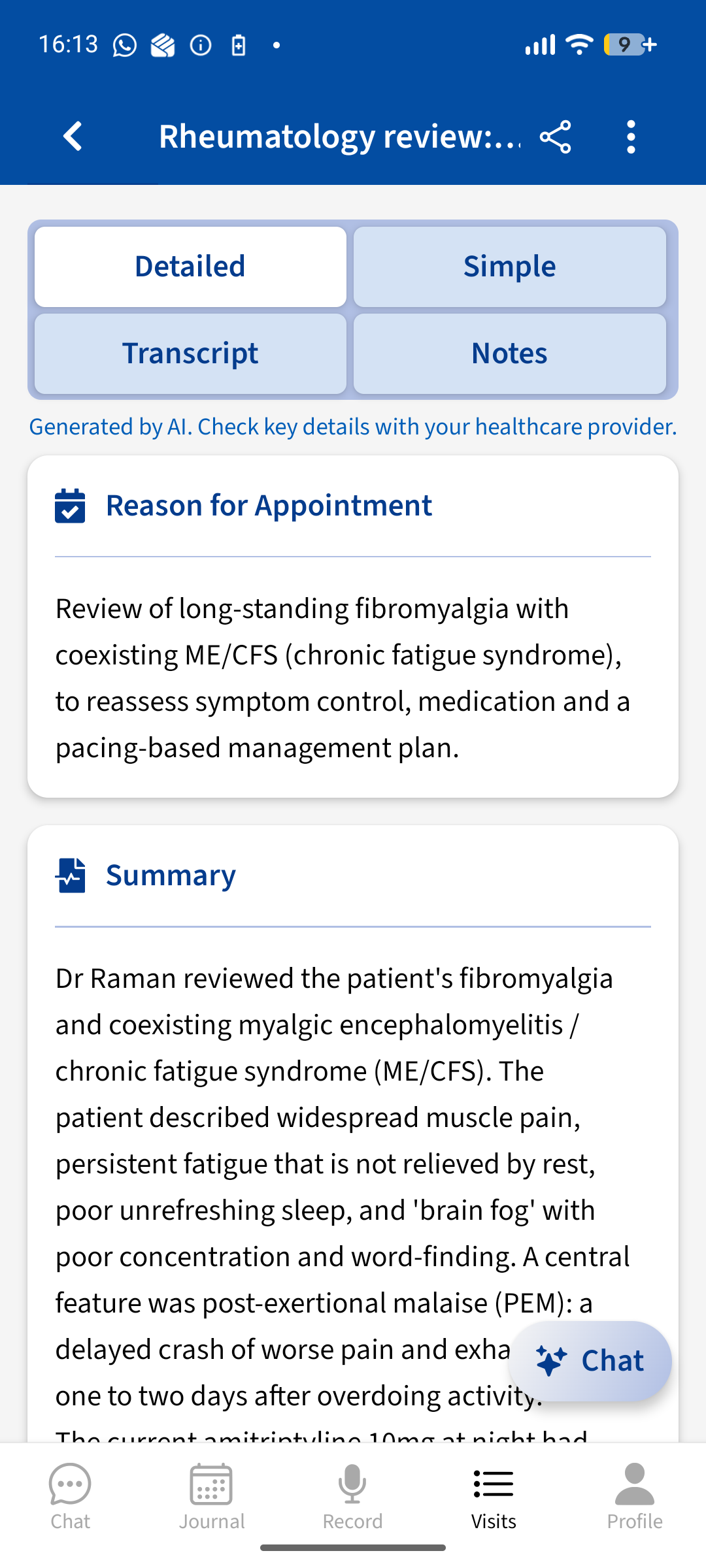
Advoca summary of a recorded rheumatology review of fibromyalgia and ME/CFS, with Detailed, Simple, Transcript and Notes tabs
THE APPOINTMENT ITSELF

Walk out with the appointment recorded, summarised and understood

A short appointment, a lot of information and a next step you half remember on the way home. Record it on your phone and Advoca turns it into a clear summary of the key points, next steps and results, with medical terms explained in plain language. The full transcript stays alongside, so you can always check what was said.

  • A clear summary instead of a blur: key points, next steps and results, with the transcript there to check.
  • No jargon left hanging. Terms are explained, and anything that looks like a wrong dose or number is flagged for you to check.
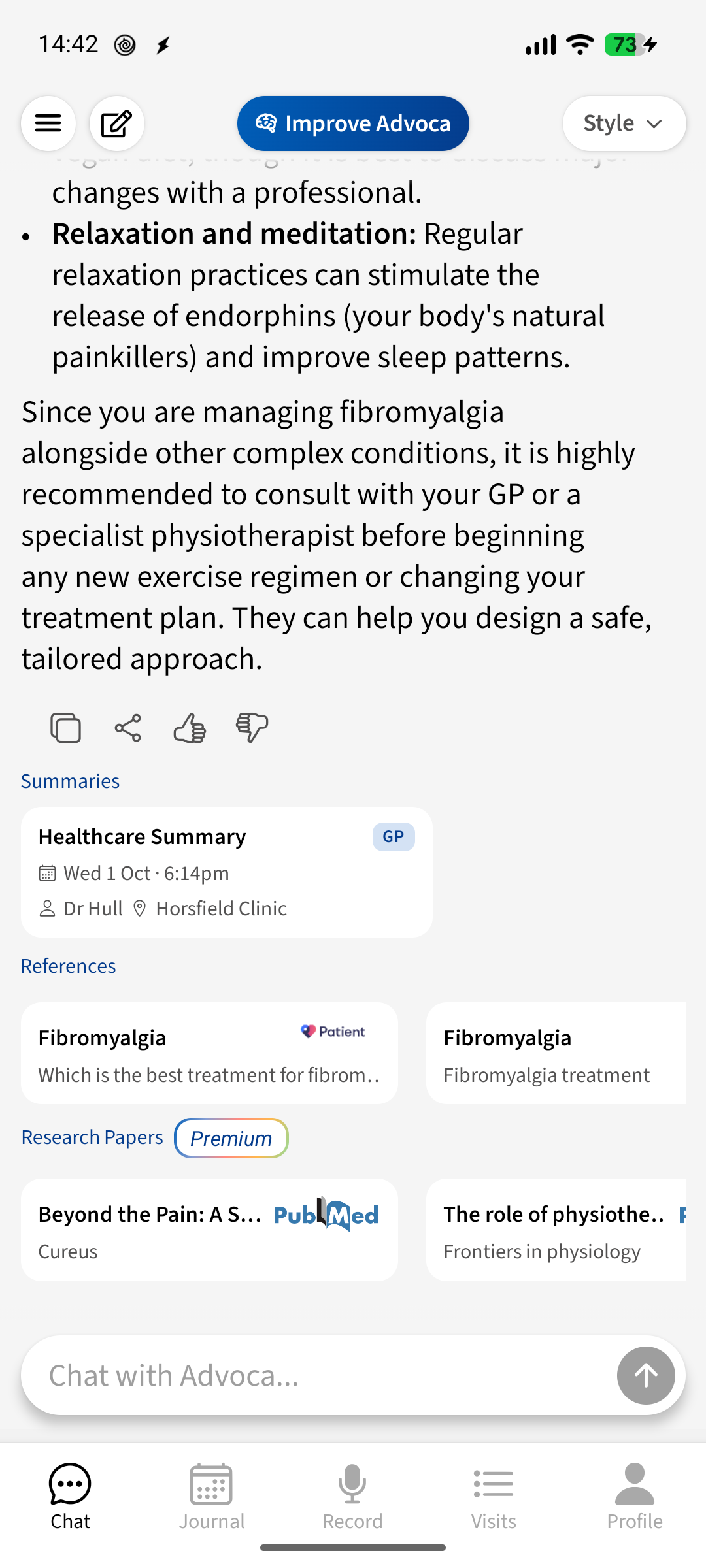
Advoca answering a fibromyalgia question, showing cited source cards from patient charities and PubMed research papers
ANSWERS YOU CAN CHECK

Ask anything about your condition, and see where the answer came from

The open web is a minefield when you're trying to understand a term from a letter or a treatment you've just been offered. Advoca answers from curated charities, patient-information sites and medical bodies chosen for your condition and region, and shows the sources under every answer. Treat it as a starting point and a question for your doctor, not personal advice.

  • Trusted sources instead of the open web, matched to your condition and region.
  • Every answer shows its sources, so you can read them for yourself.

When Juno may suit you better

Juno can be the better pick if your main need is daily support between appointments:[3]

  • You want spoon-based pacing, with your day planned against the energy you have and each activity's energy cost estimated.[3]
  • You want an in-app chronic-illness community with condition-based groups, replies and private messages.[3]
  • You want a doctor-ready report that brings symptoms, medications and notes together to email or print as a PDF.[1][5]
REAL PATIENT STORIES

See how Advoca helps people

Real video stories from people using Advoca to understand their care and feel less alone with their health.

Coral @cookiemonster3302

Living with Chronic illness and FND

“Record the conversation so you never have to worry about forgetting anything again.”
TikTok
Transcript

Are you tired of feeling like this after your appointment? Oh my goodness. What did they say? What do I have to do again? What medication am I taking again? What did they say? I want you to call someone with me. Don't worry, girly. I got you. Have you heard of this new app called Advocat? Advocat is basically an app where you can, on your doctor's appointments, record the conversation so you never have to worry about forgetting anything again. Wait, what? That's amazing. So I never have to worry about remembering anything from a doctor's appointment again? And as long as I tell them that I'm recording, it's perfectly fine? Exactly that. It is super simple. Wow. All you do. So you click on your Advocat app and once it opened with Face ID, it will go to your profile. You fill out all of your medical information. After that, you press the record button and it will come up with what you have to do. You want to see what you've recorded. You go into appointments and there's your information. So if you've got a phone call coming through, all you have to do is just press the record button on the normal phone and then it will send it to your notes app and then you just transfer it from your notes app recordings to your Advocat app. And there you go. All of your information is stored in the Advocat app. You can never be gaslit again and you never have to worry about taking anyone again. You're welcome.

Jade @chronicallyiconicx

Living with Chronic illness

“It has made me feel so much more confident going into appointments.”
TikTok
Transcript

We all know being chronically ill comes with multiple doctor's appointments, seeing different consultants for different things, and it can be so hard to keep up with all the information that's said. Quite often there are important details we miss, and a normal recording doesn't break down the key points of the conversation. But I recently came across an app called Advocat, and it's completely changed how I manage my appointments. With Advocat, you can record your doctor's appointments, and the app generates a clear summary that focuses on the most important information mentioned. No more replaying long recordings and trying to figure out what actually mattered. It also pinpoints any medication mentioned and gives you information about it, plus shares helpful resources about any conditions discussed. You can set reminders for upcoming appointments so you don 't forget anything, and write down questions you want to ask beforehand, and the app will remind you during your appointments. You can even transfer full-time recordings into the app to keep a full log of all your medical conversations. I am so glad I found this app, and it's made me feel so much more confident going into appointments. And now I've got all the important information I need, and stored easy to come back to. And the best part about it is, it is completely free and always will be. If you struggle keeping track of everything like I do, I honestly couldn't recommend it more. Go and download Advocat and try it for yourself. Take the stress out of managing your appointments.

IN THEIR WORDS

What people living with long-term conditions tell us

4.7 across 75 ratings
It's piecing together my medical journey and explaining it in a way that no other doctor has… helping me to process and understand what had happened.
— Sarah, lives with ME/CFS, fibromyalgia and post-sepsis syndrome
I have chronic pain and am neurodivergent… I struggle to explain what and where I am feeling things, so this is so helpful.
— Lynne, lives with chronic pain and is neurodivergent

Your questions, answered

Is Advoca better than Juno?

Yes, if you want a detailed symptom history without daily form-filling, plus the appointment itself recorded and summarised. Advoca builds the record from what you type or say, charts severity and daily impact separately, explains trends with cited medical sources, and keeps the transcript. Juno logs symptoms as you talk and says it saves the symptom, date and severity. [2][3]

What's the difference between Advoca and Juno?

Advoca automatically extracts severity, daily impact, onset, pattern, site and associated symptoms from your journal, charts the record and lets Premium chat search it alongside trusted medical evidence. It also prepares for, records and summarises the visit. Juno says it saves the symptom, date and severity you describe. [2][3]

Is Juno free?

Yes, for its core features. Juno says symptom tracking, pacing, health insights, doctor reports and community access are free, and Juno Pro adds unlimited AI chat and enhanced memory. [2] Prices vary by region, so check the app; its terms and US App Store listing show several paid options. [3][4][6] Checked 14 October 2026.

Is Advoca free?

Yes. All core features are free, including journaling, automatic symptom tracking with the last two weeks of charts, appointment preparation and unlimited appointment recording, with a generous daily chat allowance. Premium adds full symptom history and filters, all Quick Insights, chat over your symptom history, unlimited chat, the latest research papers and wearables. You don't need to join our research community to use Advoca for free.

How do Advoca and Juno handle my health data?

Advoca stores permanent records in the UK, uses zero-retention arrangements with sensitive processors, encrypts appointment audio on your device, and lets you export and delete your data. No health information is shared for advertising. Joining the research community is optional: if you join, your data is anonymised first and you can earn rewards. Juno says health data is encrypted and stored on servers in the United States, including for users outside the US, does not sell health data, and lets you request a copy or delete your account, with data removed from live systems within 30 days. [8][2][7]

Can Advoca or Juno record my doctor's appointment?

Advoca can. Record an appointment for up to 90 minutes, even offline, and get a sectioned summary of the key points, next steps and results, with medical terms explained and the transcript kept. Juno doesn't record or summarise appointments; its doctor report is built from what you tell Juno. [1][2][3] Whichever app you use, tell your clinician you'd like to record, and check the rules where you live.

Can I take my data with me if I switch?

With Advoca you can request a machine-readable copy of your data or delete it from inside the app; our privacy policy has the details. [8] Juno's policy says you can request a copy of your records, correct or delete content, or delete your account, with data removed from live systems within 30 days. [7]

How we compared Juno and Advoca

This page was written by Dr Shyam Dhokia and reviewed by Dr Michael Trueman, both former NHS doctors and co-founders of Advoca. This comparison is published by Advoca. It is not an independent head-to-head test: we compared Juno's own website, FAQ, App Store and Google Play listings, terms and privacy policy, checked on the date shown, and link each claim to its source. Facts about Advoca come from our own product and published policies. Prices, features and policies change, so check Juno's own site before you decide. Last checked 14 October 2026.

Spotted something out of date or wrong? Email [email protected] and we'll check and correct it.

Sources
  1. [1]Juno: Chronic Illness Support App | Pacing & Symptoms — Juno (SharedGenes, Inc.) (official source). Checked 14 October 2026.
  2. [2]Juno FAQ — Juno (SharedGenes, Inc.) (official source). Checked 14 October 2026.
  3. [3]Juno: Chronic Illness Support (App Store listing, US) — Apple App Store (official source). Checked 14 October 2026.
  4. [4]Juno: Symptom Tracker (Google Play listing) — Google Play (official source). Checked 14 October 2026.
  5. [5]Sample doctor-ready report | Juno — Juno (SharedGenes, Inc.) (official source). Checked 14 October 2026.
  6. [6]Terms of Service — Juno — Juno (SharedGenes, Inc.) (official source). Checked 14 October 2026.
  7. [7]Privacy Policy — Juno — Juno (SharedGenes, Inc.) (official source). Checked 14 October 2026.
  8. [8]Advoca Privacy Policy — Advoca (official source). Checked 14 October 2026.
  9. [9]Juno ratings and reviews (US App Store) — Apple App Store. Checked 20 October 2026.
  10. [10]Juno ratings and reviews (UK App Store) — Apple App Store. Checked 20 October 2026.
Medical disclaimer

Advoca helps you record, understand and organise your care. It is not a substitute for professional medical advice, and it does not diagnose conditions or make treatment decisions — always speak to a qualified healthcare professional.

Not affiliated

Advoca is not affiliated with, endorsed by or sponsored by Juno. Juno and its product names are trademarks of their owner and are used here only to identify the app being compared.

How the AI works

Advoca's assistant transcribes, summarises and explains your health information, grounded in trusted medical sources and overseen by our clinical team. It does not diagnose or replace your doctor — and, like any AI, it can occasionally get things wrong, so we always show you the sources and full transcript behind its answers.

Become an expert on your own care.

Free to download, built by doctors, and private by design. Start in minutes.

Download free